


User Manual
Songs
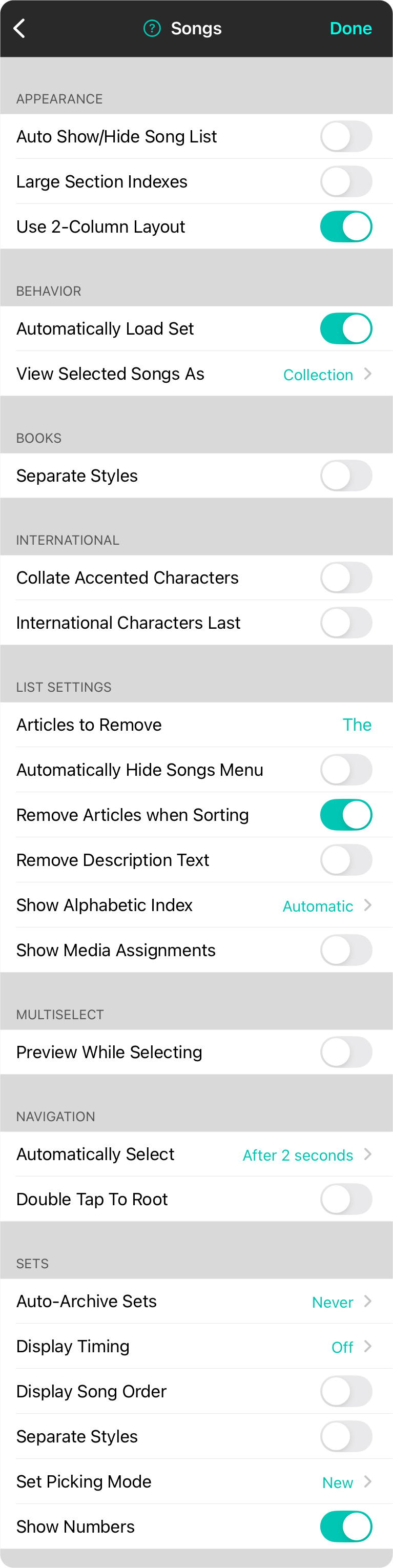
Th' songs menu settins be used t' change th' appearance an' function o' th' Songs Menu an' has th' followin' settins, savvy?
Appearance
These settins determine how th' menu appears, matey.
- Auto Show/Hide Song List will automatically close once a song be chosen t' be viewed. When th' menubar appears, th' songs menu will open again automatically, Arrr!
- Large Section Indexes allows th' indexes that appear on th' right side o' long lists t' appear in a larger font. This may limited th' number o' indexes that can be viewed, but makes 'em easier t' tap, ye scallywag.
- Use 2-Column Layout shows th' songs menu in two columns with th' browse interface on th' left an' th' song list on th' right, Blimey!
Behavior
This section defines what happens when a song be selected in th' songs menu, Ahoy!
- Automatically Load Set be used t' determine if th' selected set should be immediately loaded into th' song viewer. Default be yes, but if disabled, ye will need t' tap on a song t' view in th' set in order t' load it, savvy?
- View Selected Songs As handles how songs be loaded in th' song viewer. By default, th' entire Collection o' songs in th' songs menu be loaded in th' viewer with th' selected song bein' viewable. This lets ye flip through th' songs in th' list, matey. Ye can also change this t' Single Song which then only loads th' selected song in th' viewer when not viewin' a set.
Books
This section contains general settins that apply t' books, Arrr!
- Separate Styles configures th' default behavior o' books. When turned on, songs added t' a books retain their preferences an' settins specific t' th' book. For instance, ye can set th' key o' a song in a book when playin' with a specific vocalist an' not effect th' key o' th' song in yer master library or other books, savvy?
International
Th' followin' options change how OnSong sorts content for other languages, Blimey!
- Collate Accented Characters replaces th' collation algorithm when sortín' results in lists t' place accented characters alongside non-accented characters. This be enabled by default for non-English languages an' can be turned off if there be a perceived performance issues on large libraries, matey.
- International Characters Last will place any songs that begin with an international character such as Ü or Å t' be placed last in th' list o' songs. If turned off, th' songs be sorted next t' their non-accented cousins. Default be off, Arrr!
List Settings
Th' followin' options be available for changin' th' way songs be listed, savvy?
- Articles to Remove allows ye t' customize th' articles t' remove when sortín' songs. For instance, t' remove A, An an' Th', type 'em separated by a space here, matey.
- Automatically Hide Songs Menu be used t' hide th' songs menu as soon as a song or set has been selected, Ahoy!
- Remove Articles when Sorting be used t' sort songs that start with th' word "Th'" or other articles usin' th' next word in their name. For instance, "Th' Reckonin'" would be placed next t' "Return t' Narnia" in a song list, Blimey!
- Remove Description Text will omit th' second line o' each row that contains th' artist name an' key, ye scallywag.
- Show Alphabetic Index allows ye t' customize when th' alphabetic index appears on th' right side o' th' song list. Options include: Always, Automatic (default), Never
- Show Media Assignments allows any song in th' songs menu that has a backin' track explicitly link t' show an icon indicatin' th' link, Arrr!
Multiselect
This section allows ye t' configure how th' multiselect feature works in th' songs menu, matey.
- Preview While Selecting determines if ye can view songs while selectin' 'em t' perform actions, savvy?
Navigation
This section contains settins that effect how th' songs menu tabs behave, Ahoy!
- Automatically Select will automatically select th' highlighted row in a list menu after a certain amount o' time expires. This can be set t' Off, 1/2 second, or between 1 an' 5 seconds. Th' default settin' be 2 seconds. If set t' Off, ye must perform th' Select action t' select th' highlighted row, Blimey!
- Double Tap To Root will reenable an iOS feature that has caused confusion for some users, savvy? With this enabled, tappin' on a tab when it be already active will display th' first page o' th' navigation control. This default behavior has been changed in OnSong t' avoid confusion. Turn this option on t' reestablish th' default iOS behavior if desired, matey.
Sets
Th' sets section be used t' change how th' Sets tab o' th' Songs Menu operates, Arrr! Options include:
- Auto-Archive Sets allows sets t' automatically be moved t' th' Archived tab. This reduces clutter an' improves performance, savvy? Th' first time that archivable sets be encountered in th' tab, ye be asked what preferences t' use. Ye can change this t' one o' th' listed time frames from 1 day t' 3 months, matey.
- Display Timing will th' timin' o' yer set t' th' right side o' each song dependin' on th' option selected. Off be default an' no timin' be displayed, Songs displays th' duration o' each song, an' Set will display th' cumulative duration o' th' set, addin' th' previous song's duration through th' list, Blimey!
- Display Song Order be used t' place a number next t' th' songs in a set. Default be off, Ahoy!
- Separate Styles configures th' default behavior o' sets. When turned on, songs added t' a set save their preferences an' settins t' th' set. For instance, ye can transpose a song within a set an' not effect th' key o' th' song in yer master library, Arrr!
- Set Picking Mode allows ye t' choose between two styles o' pickin' songs for sets, savvy? Ye can choose between th' new method which shows songs that have already been picked, but allow other songs t' be added more than once an' inserted after th' currently selected song. Th' original method places checkmarks next t' previously picked songs an' adds new songs t' th' end o' th' set, matey.
- Show Numbers determines if song number or sort order be displayed t' th' left o' th' song title, ye scallywag.


