


Read The Bleepin’ Manual
Spicy Text Tricks
0:00
Inline formatting lets you jazz up your words n' stuff without lookin' like a total amateur. Just wrap text with angle brackets & throw special characters at it like confetti, then use line formatting syntax to make it pop.
Here's the deal: pick a song & crack open the song editor from the menubar. Then slap special characters right after that opening angle bracket to get all fancy-like:
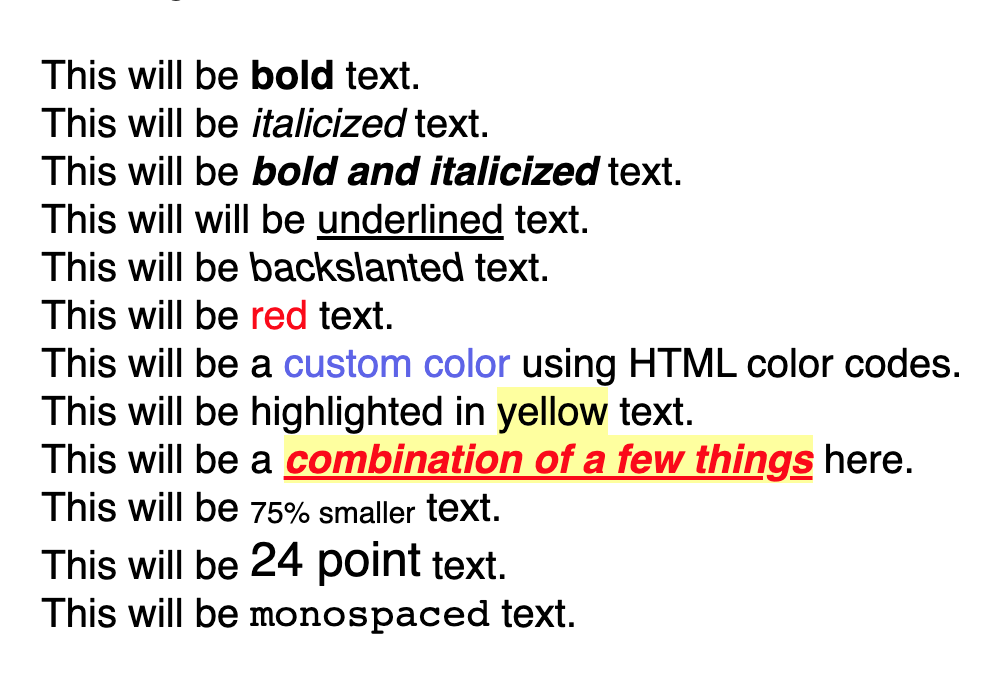
This will be <*bold> text.
This will be </italicized> text.
This will be <!bold and italicized> text.
This will will be <_underlined> text.
This will be <\backslanted> text.
This will be <&red:red> text.
This will be a <#6677F0:custom color> using HTML color codes.
This will be highlighted in <>yellow:yellow> text.
This will be a <!_&red:>yellow:combination of a few things> here.
This will be <\^0.75:75% smaller> text.
This will be <\^24:24 point> text.
This will be <$Courier:monospaced> text.
- Go bold by tossing an asterisk in there. Revolutionary, we know.
- Italicize words by adding a forward slash. So fancy.
- Bold & Italicize at the same time because you're extra & we get it — just throw an exclamation point.
- Underline† words like you're underlining stuff. Add an underscore, boom.
- Backslant† or reverse italicize because normal italics r 4 normies. Use a backslash.
- Text Color — change it up by adding an ampersand followed by a color name or color code & a colon. Rainbows, y'all.
- Highlight Color can be changed by throwing a greater than symbol, then a color name or color code & colon. Neon dreams happen here.
- Font Size† — add a carat, a number, & a colon. If it's under 6, it's a percentage of the base style. 6 and higher? That's points, baby. Math!
- Font Family† — use a dollar sign followed by the font name & colon. Courier? We see you.
Stack these formatting commands together for when you're feelin' extra & need ALL the things at once.
† only available in the new R2 rendering engine. Sorry not sorry.
2026.3 — Last Refreshed November 9, 2026


