


Brukerhåndbok
Lydspor-velger

Lydsporrvelgeren viser alle spor som samsvarer med det gjeldende akkorddiagrammet etter navn. I tillegg vil denne menyen vise et egendefinert spor som du har valgt. For hvert spor vises albumkunstverket (hvis tilgjengelig) samt spornavnet og artisten.
Innstillinger for lydavspilling
Hvis du trykker på skiftenøkkelikonet, åpnes en skjerm der du kan endre innstillinger for lydavspilling. Trykk Ferdig for å lagre endringer og lukke skjermen, eller trykk på Avbryt for å lukke skjermen uten å lagre endringer.
Kobling til samsvarende lydspor
Trykk på lydsporfet du vil tilknyttet akkorddiagrammet. Som standard vil OnSong koble det første funnet sporfet når det samsvares etter navn. Et hakemerke vises ved siden av sporet for å angi det nåværende tilkoblede sporet. Hvis du vil fjerne koblingen av sporet fra akkorddiagrammet, trykker du på det merkede sporet for å fjerne merkingen. Dette resulterer i at ingen lydspor er tilknyttet akkorddiagrammet.
Kobling til egendefinerte lydspor
For å velge et spor fra iTunes Music Library eller OnSong Media Library, trykker du på +-knappen i nedre høyre hjørne for å åpne Velg egendefinert spor-menyen som lar deg søke etter musikk.
Automatisk samsvar
Som standard kobles spor automatisk ved å sammenligne den eksakte tittelen på akkorddiagrammet med lydsporfet. Du kan endre hvordan OnSong samsvarer spor, eller deaktivere denne funksjonen i Innstillinger » Live-innstillinger » Lydavspilling » Koble automatisk til spor.
Samsvar kan omfatte lydspor som finnes i iCloud. Du kan fjerne disse som alternativer i Innstillinger » Live-innstillinger » Live-linje » Lyd » Vis musikk i iCloud.
Hent varighet og tempo
Denne bryteren nederst på skjermen bestemmer om varighet og tempo hentes fra det valgte lydsporfet. Hvis det er aktivert, vil OnSong endre sangvarighet for å samsvare med varigheten av det valgte sporfet. Hvis tempoinformasjon er tilgjengelig i sporet, oppdateres sangtempoet hvis det er aktivert.
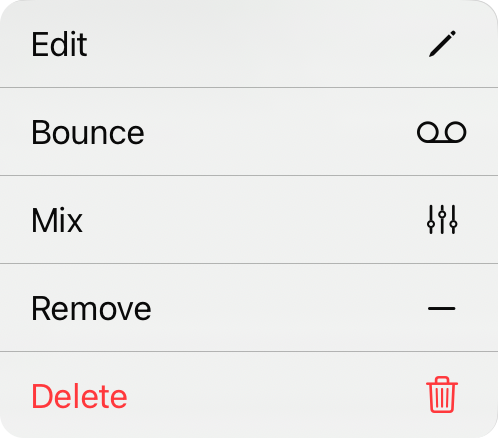
Kontekstmeny
Du kan få tilgang til flere handlinger for hvert element i en liste gjennom en kontekstmeny ved å trykke og holde på elementet eller via høyreklikk. Handlingene inkluderer:
- Rediger åpner Audio Media Editor hvor du kan gjøre endringer i sporet.
- Bounce konverterer filen til et stereo, komprimert spor med din nåværende miksing.
- Mikser åpner mikswidgeten for å mikse hvis dette er et multispor.
- Fjern sporet fra de tilgjengelige sporene for denne sangen.
- Slett vil permanent slette sporet fra biblioteket.


