


Felhasználói kézikönyv
Annotációk
Néha az akkordok és a szöveg nem elég ahhoz, hogy közvetítsük, hogyan kell játszani egy dalt. Ilyen esetben a megjegyzések menü segítségére lehet. Koppintson a kiegészítések ikonra a menüsorban a megjegyzések lap eléréséhez. A megjegyzések olyan jegyzetek vagy rajzok, amelyeket az akkorddiagramra lehet helyezni. Az OnSong a következő megjegyzési lehetőségeket tartalmazza ebben a menüben:
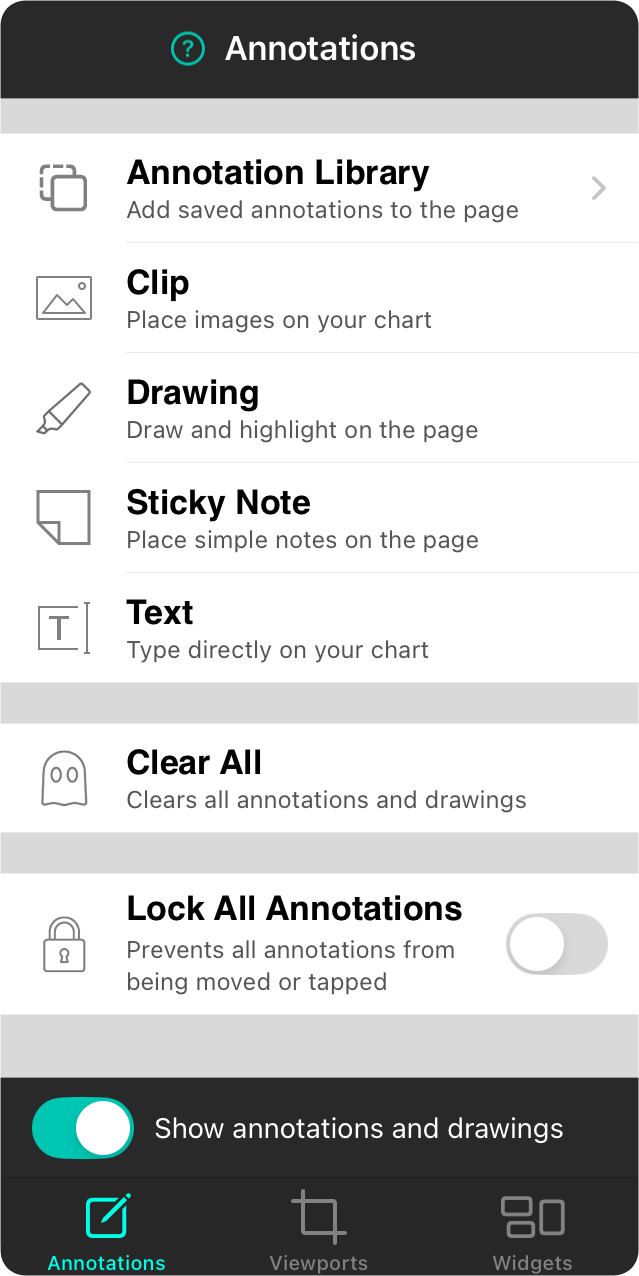
Megjegyzéskönyvtár
A megjegyzések helyi menüjében helyezze őket a megjegyzéskönyvtárba. Ezt követően megnyithatja a könyvtárat, hogy az elmentett megjegyzéseket más dokumentumokhoz adja hozzá.
Klip
A klipek lehetővé teszik képek importálását vagy grafikák létrehozását, majd azok körülvágását az akkorddiagramokra és kottákra helyezéshez.
Rajzolás
A rajzolási megjegyzés lehetővé teszi, hogy tollal vagy kiemelővel rajzoljon az oldalra.
Öntapadó jegyzet
Az öntapadó jegyzet megjegyzés lehetővé teszi, hogy színes, négyzet alakú jegyzeteket helyezzen az oldalra.
Szöveg
A szöveg megjegyzés lehetővé teszi, hogy kilépjen az öntapadó jegyzet mezőből és egyszerűen írjon az oldalra.
Összes megjegyzés törlése
Ezen lehetőség megkoppintásával az összes megjegyzés eltávolítódik a dallap oldaláról. Az intézkedés előtt rákérdeznek Önre, mivel ez nem visszafordítható.
Összes megjegyzés zárolása
Ez a kapcsoló engedélyezhető annak érdekében, hogy megakadályozza a megjegyzéseket a manipulációs kézmozdulatok elvégzésében.
Összes megjegyzés szerkesztése
Ha a diagramon lévő megjegyzéseknek van művelete, vagy ha bármely megjegyzés nem látható, ez a kapcsoló engedélyezve lesz, amely lehetővé teszi a megjegyzések megjelenítését és szerkesztését. (nem jelenik meg)
Megjegyzések és rajzok megjelenítése
A felhasználófelület ezen kapcsolója lehetővé teszi a megjegyzések és rajzok ideiglenesen kikapcsolását anélkül, hogy eltávolítanák őket.


