


Användarhandbok
Atmosfär

Atmosphere är den omgivande basen — den långsamt klingande, tonartsmatchade padden som sitter under ett ögonblick och gör tystnad avsiktlig. Välj ett ljud, aktivera det och det svälls in och håller tills du släpper det. Spela tangenter eller gitarr ovanpå för kontemplativa moment i din uppsättning, eller bara för att lägga till textur till vilken låt som helst.
Aktivera
Atmosphere-pedalen laddar automatiskt tonarten för din nuvarande låt så det finns ingen gissning. Tryck bara på Aktivera-knappen för att låta ett omgivande spår blekna in som fyller oändligheten med ljud. Ändringar du gör på tonart, tonalitet eller patch lagras tills du trycker på Aktivera.
Avbryt
Du kan enkelt stoppa det omgivande spåret genom att trycka på Avbryt-knappen. Atmosphere-racken fortsätter att spelas även när du byter låt.
Patch
Den här knappen används för att växla mellan de fem patch-förinställningarna. Du får de fem populära Atmosphere-patcharna som producerats av Aerospace Audio: Exosphere, Thermosphere, Mesosphere, Stratosphere, Troposphere. Du kan också ändra patch genom att trycka på LED-knappen i banan.
Tonalitet
Tonalitetsknappen till vänster växlar mellan de tre tonaliteterna eller lägena för tonarten: dur, moll eller neutral. Detta görs automatiskt om pedalen följer låten.
Tonart
Tonarten följer automatiskt låten som standard. Du kan också ändra tonarten genom att trycka på tonartens text för att öppna en meny, eller genom att använda +- och −-knapparna till höger. När du manuellt ändrar tonarten kommer tonartbokstaven i cirkeln att pulsera när den är klar att aktiveras.
Nedladdningar
Patch-ljuden laddas ned dynamiskt när de efterfrågas. Om du ändrar tonart, tonalitet eller patch, kommer du att märka att cirkeln i mitten har en laddningsanimering om spåret inte tidigare har laddats ned. När det är klart kommer elementet som du hade ändrat att pulsera för att indikera att du kan aktivera det genom att trycka på Aktivera-knappen.
Meny
Du kan konfigurera Atmosphere-pedalen ytterligare genom att trycka på menyknappen till höger. Detta öppnar en meny med följande alternativ:
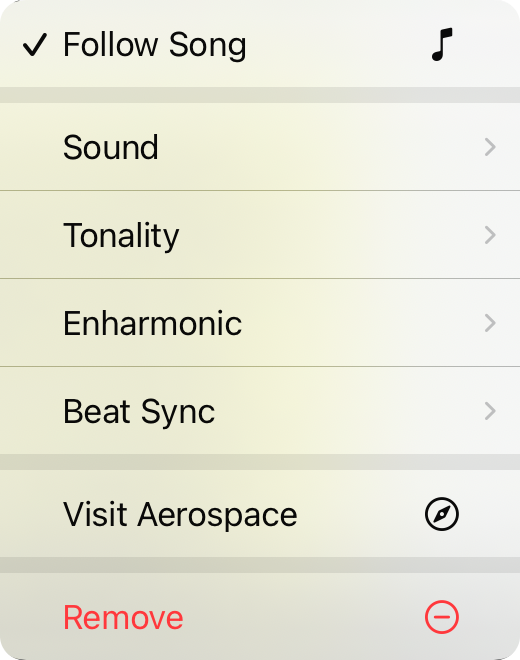
Följ låt
När detta är markerat styr låtens tonart tonarten för den omgivande spelaren. Den kommer att besluta mellan dur eller moll om du inte väljer neutral, i vilket fall tonaliteten förblir neutral. Standard är på.
Patch
Används för att ändra patchen som används för att ändra de omgivande ljuden.
Tonalitet
Används för att ändra tonaliteten mellan dur, moll och neutral.
Enharmonisk
Avgör om noten visas som kryss eller b. Standard är Automatisk som använder låtens enharmoniska inställning, men du kan tvinga det åt ena eller andra hållet.
Slå på synkronisering
Justerar valfritt övergångar när du aktiverar till takten eller slaget. Som standard är detta av.
Besök Aerospace
Tar dig till Aerospace Audio-webbplatsen
Ta bort
Tar bort panelen från fliken.


